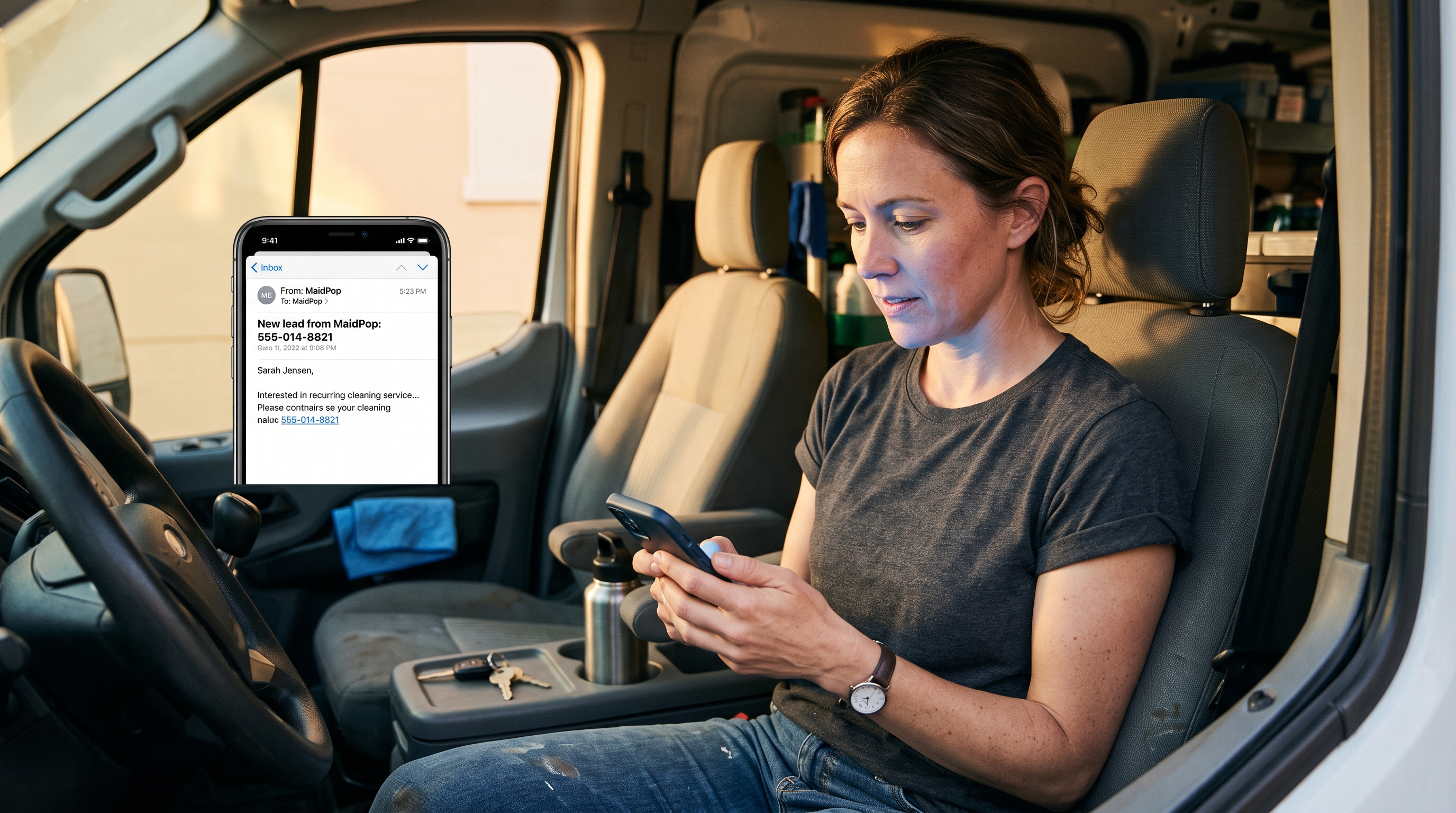
You know a cleaning website lead came in while you are on a job when MaidPop emails you the new email or phone number, so you do not have to sit on the dashboard, and you add a webhook only if you already have scheduling software that should get the same lead. MaidPop emails you when someone fills out your cleaning website popup, so you can call without watching the dashboard.
You're still on the job.
Phone is in the van or on silent. Someone just left a phone number or an email on your site. If the only way you find out is opening the dashboard after the last house, they are still comparing you to the other two tabs. This post is the ping after they raise a hand. How the site captures cleaning leads 24/7 is the unattended capture. Quote requests is one-field, then you call. Lead magnets is what to offer. This one is how you find out.
The short version
Set a lead-notification email. MaidPop emails you when the popup gets a phone number or an email.
Add a webhook only if you already have scheduling software.
That is the alert. You still have to call.
How do I know a cleaning website lead came in while I am on a job?
You know because MaidPop emails you. A new popup lead sends a notification to the lead-notification email, or to the account email if you left that box blank. You do not have to watch the dashboard. If the email lands on your phone, you can tap the number. That is still an email, not a text from MaidPop.
The site can catch them. The email tells you.
You're mid-clean. They submitted. People say instant because they do not want to watch the dashboard. What you actually get is mail. The subject looks like New lead from MaidPop, then their email or phone. Open it. Call them. You do not get a lock-screen push from us, and you do not get an SMS. Mail on your phone is enough if that is the inbox you actually look at.
Where should the notification email go?
Send it to an inbox you actually open on a job. Your own phone email is usually right. A shared office inbox is fine if someone is looking at it. Leave Lead notification email blank and MaidPop uses the account email. Do not point it at an address nobody checks until Sunday night.
It has to be an inbox you will see.
If mail is already on your phone, use that address. The email can include a tappable phone link so you can call from the van without copying digits. That is still mail. It is not an SMS and it is not a push from MaidPop. If two people follow up, pick the inbox the person who calls will see. One inbox. One habit.
Do I need a webhook, or is email enough?
Email is enough if you will call from the message. You need a webhook only if you already have scheduling software and you want the lead to land there instead of sitting in your inbox. Most owners start with email. The webhook is the other door, not a requirement.
Email is the ping. The webhook is the handoff.
A webhook is a URL your other tool already knows how to receive. You paste that URL on Settings or Leads. The new lead can pass into the scheduling software you already use, so you are not copying names out of mail. If you do not have that software, skip the box. Do not buy a tool just to fill it. Email first. Webhook when you already have a place for the lead to go.
How fast do I need to call after the email?
Call as soon as you can talk. They still have the other tabs open. There is no five-minute rule. Finish the room if you have to, then call from the van. A calm call beats a rushed one from a client's driveway.
They asked. They are still deciding.
How to get more quote requests already covers the one-field ask, then you finish on the call. This one is only the ping that tells you they asked. Don't wait until you get to the computer. Don't call from a driveway if you will sound tired. Call when you can give them a real conversation.
How do I turn lead notifications on in MaidPop?
Open Settings or Leads and set Lead notification email. Leave it blank if the account email is the one you want. Paste a Webhook URL only if you already have scheduling software that can take it. The popup itself is the under-60-second part. The email field is one box.
One box. Then go back to the job.
The one I'd point you to is MaidPop, a free lead-capture popup for cleaning company websites. You enter your company name, pick a template already written for maid services, paste one line of code, and you can be live in under 60 seconds. Then set the notification email so you hear about the lead. Templates already exist for a discount, a guarantee, a simple text ask, and recurring work. Exit-intent, where it fires as they close the tab, is coming soon.
MaidPop is a free tool from the team behind the Filthy Rich Cleaners podcast. It's free forever on the default plan, not a trial that turns into a bill. The free plan shows a small Powered by MaidPop line. Refer three companies who install and you can co-brand that line. Pro is $50 a year if you want the branding gone.
Want a Quote by Text?
Drop your number below and Sparkle & Shine can text you back about your cleaning needs.

It will not text you. It will email you, and it can hit a webhook, when someone leaves a phone number or an email.
If you want a free popup that emails you the new lead, that is the whole product.
Common questions about instant lead notifications
How do I know a cleaning website lead came in while I am on a job?
MaidPop emails you the new email or phone number. You do not have to watch the dashboard. If that email lands on your phone, you can tap the number and call. That is still an email, not a text from MaidPop.
Where should the notification email go?
To an inbox you actually open while you work. Your own phone email is usually right. Leave the field blank and it uses the account email. Do not send it to an address nobody checks until Sunday.
Do I need a webhook, or is email enough?
Email is enough if you will call from the message. Add a webhook only if you already have scheduling software and you want the lead to land there. Most owners start with email. The webhook is optional.
How fast do I need to call after the email?
As soon as you can talk. They still have the other tabs open. Finish the room if you have to, then call from the van. A calm call beats a rushed one from a client's driveway.
How do I turn lead notifications on in MaidPop?
Open Settings or Leads and set Lead notification email. Leave it blank if the account email is the one you want. Paste a Webhook URL only if you already have scheduling software that can take it.
You don't have to watch the dashboard
The popup catches the hand-raise. The email tells you. You still make the call.
If you want that loop already written for a maid service, put a one-field popup on your cleaning website and turn the notification email on today.